

Discovery Begins With Your Preferences
The current Android description explains matching in terms of relationship preferences, education, location, and personality information. Those inputs can help focus introductions around more than a quick visual impression. They also make the accuracy of your own profile important: incomplete or aspirational answers provide a weaker basis for discovering compatible people.
Use preferences to distinguish essential needs from flexible wishes. A location constraint tied to parenting may be essential; a narrow hobby requirement may exclude someone you would enjoy meeting. Adjust thoughtfully rather than changing every setting after one quiet day. Matching tools organize possibilities, but they cannot tell you whether conversation will feel easy or whether another person's availability fits yours.
Daily Selections Can Support a More Focused Habit
Daily Selections is named in the current iPhone listing as part of an approach emphasizing quality over constant swiping. Treat it as a starting point for paying attention to a manageable set of possibilities, not as a guarantee that every suggested profile will suit you.
Read the details before acting. Notice a relationship intention, an interest, or a practical compatibility question that deserves a conversation. If you only glance at the photograph, a more considered discovery feature offers little advantage over any other visual feed. A focused routine can also help busy adults avoid checking throughout the day. The schedule guide shows how to give dating a limited but reliable place in the week.
Voice Introductions Add Tone to Your Profile
The iPhone product description includes Voice Introductions. A short spoken introduction can communicate pace, warmth, and personality in a way written text cannot fully capture. It may be useful for someone whose humor or enthusiasm is easier to hear than to describe.
Keep the content simple and appropriate for people you do not yet know. You might talk about an interest or a small enjoyable part of your week. Do not read out contact details, workplace information, or a rehearsed list of achievements. A recording is still a public-facing piece of profile content, not a private conversation. Feature placement and availability can change, so use the controls and guidance shown in your current account rather than assuming an exact menu path from a general description.
A Profile Gives the Conversation Somewhere to Go
Profile details are useful when they reveal what spending time with you might be like. An interest, a routine, and a relationship intention create several natural conversation openings. A title and a flattering photograph alone leave another person doing much more guesswork.
The profile writing examples show how to translate abstract qualities into specific scenes. That is not a special algorithm trick. It is a way of giving another human being something real to respond to. Keep your information accurate and avoid portraying a lifestyle you would not want to maintain. The strongest use of a detailed profile is to attract a relevant conversation, not the maximum number of indiscriminate responses.
Date Manager and Ongoing Connections
Date Manager is described in the iPhone listing as a way to keep track of connections and the dating journey. Organization can be helpful when conversations develop at different speeds or when a busy week makes it easy to forget a detail you wanted to revisit.
Do not assume that a management feature establishes exclusivity, confirms a meeting on the other person's behalf, or creates a shared agreement about your relationship. Those things require direct conversation. Use organizational tools to remember what matters and follow through considerately. Avoid treating people as tasks to process. The purpose of remembering a detail is to be more attentive, not to make dating feel like managing a sales pipeline.
Messaging Works Best With Something Specific
Communication tools provide a channel; you provide the substance. Mention a detail in the person's profile, share a small response of your own, and ask one question they can answer comfortably. A tailored message is easier to engage with than a generic greeting sent to many people.
For concrete examples, the first-message guide explores interests, work, brief profiles, and follow-ups. Do not infer unrestricted free messaging from the existence of a chat interface or a screenshot. Communication entitlements can depend on the current membership offer. Check the access information presented in your account before buying a plan for a particular interaction feature.
Verification and Reporting Serve Different Purposes
Verification is about a defined account or identity-related process; reporting concerns a specific problem or behavior. They should not be collapsed into one broad promise of safety. A verified profile can still behave inappropriately, and a polished appearance should not discourage you from reporting a concern.
The service's public help identifies reporting routes from profile or conversation menus. Its agreement also says it does not conduct member background checks. Our privacy and safety explanation addresses those boundaries in more depth. Use a report to communicate a concrete issue, retain relevant information when safe, and turn to local emergency assistance when the problem is immediate rather than waiting for a platform response.
Website and Mobile Access Offer Different Comforts
The website can be convenient for reading detailed information and writing an introduction with a full keyboard. The apps can make a brief return to an ongoing conversation easier. Official help describes using the same account across the web and app, which avoids splitting your profile and messages between separate identities.
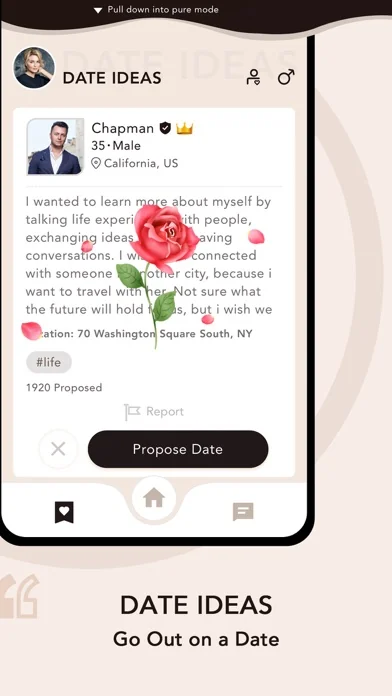
Choose according to the task, not a belief that one device automatically produces better matches. The app overview provides both platform routes. Screenshots show a representative product presentation, while the version installed on your device may look different. Do not assume an iPhone listing establishes Android feature parity, or that a web price must match an app-store purchase.
Match the Feature to the Moment
| Your Immediate Task | Relevant Product Area | Your Contribution |
|---|---|---|
| Find people with compatible priorities | Preferences, filters, and discovery | Accurate information and sensible flexibility |
| Make an introduction feel personal | Profile details and available voice tools | A specific, truthful glimpse of your life |
| Continue a promising exchange | Messaging and shared account access | Reciprocal attention and respectful timing |
| Keep track of a developing connection | Available date-management tools | Clear plans and considerate follow-through |
The table is a use guide, not an entitlement chart. Platform, membership, and regional availability can differ. When a tool matters to your decision, confirm its presence and access conditions in the offer you are considering. This avoids paying for an assumption based on a feature name alone.
Use the Tools Without Losing the Person
Features can reduce friction, organize information, and give you more ways to introduce yourself. They do not remove uncertainty from dating, and they do not replace the need to notice how another person behaves. A useful product experience should leave you with more attention for the connection itself.
Start with the few tools that support your current need. If your profile is thin, improve it before changing every discovery setting. If a conversation is going well, consider a comfortable next step rather than continuing to browse automatically. When the product is helping you communicate more clearly and act more considerately, its features are serving the relationship goal rather than becoming a distraction from it.